Agents present a new front where cyberattacks can happen, and I wanted to explore how, as a product designer, I could learn about and tackle a specific area. I landed on a type of agent attack called "prompt injection".
Agents can now have access to our emails, calendars and other sources of personal data. Combine that with an agent's inability to tell an instruction with malicious intent from a genuine request, and you have a weakness.
So my question was: how do we defend against this, and what happens next?
With little to no experience in cybersecurity, my goal with this project wasn't a mock, a prototype or some other design output. It was more of a thinking exercise and a way to satisfy my curiosity, although I made some design artifacts with Claude as visual aids.
Two attacks
EchoLeak Microsoft 365 Copilot
An attacker sent an ordinary-looking email with hidden instructions written for an AI. Later, an employee asked Copilot a normal question. Copilot read the email, followed the instructions and tucked private data into an image link in its reply. The image loaded on its own, and the data left through a Microsoft service the company trusted.
The lesson No click is needed, and data can leave through a route you trust.
ShadowLeak ChatGPT Deep Research
A similar trick, aimed at ChatGPT's research agent while it read a person's inbox. This time the data was sent from OpenAI's own servers. The company's firewalls, network monitoring and data loss tools never saw a thing. OpenAI fixed it in August 2025, and it was made public in September.
The lesson It happened where the company's tools couldn't see.
Both attacks exploited the same three things: internal data the agent can read, outside content it takes in, and a way to send data out. Simon Willison calls this "the lethal trifecta". Meta has a similar idea, the "Agents Rule of Two": an agent shouldn't have all three without human supervision.
These and similar documented attacks, like AgentFlayer, led me to ask three questions. Could this happen to us? What happened? How do we stop it?
Reading list 6 sources
EchoLeak, Aim Labs. A zero-click attack on Microsoft 365 Copilot. Now on Cato Networks' blog, since Aim's research team became Cato AI Labs.
ShadowLeak, White Cloud Security. A report on Radware's research into ChatGPT Deep Research.
AgentFlayer, Zenity Labs. A zero-click attack through ChatGPT Connectors.
The lethal trifecta, Simon Willison. Private data, untrusted content and a way out.
Agents Rule of Two, Meta AI. No more than two of the three without supervision.
I compiled ten conclusions from my reading. They fit into three buckets, Identify, Trace and Contain, which match the three questions above.
1 / 17
Short on time? Jump to the three part slides, Identify, Trace and Contain, for the gist
From learnings to features
My first pass jumped straight from learnings to features. I was eager to find a solution for each learning, but when I put them all together, it was clear I was missing the job each one was supposed to do. So I backtracked and wrote a job for each learning, plus a way to know when it was done. That became my bridge from learning to feature.
The job
What's needed
What we built
Identify Could this happen to us?
When an attack like EchoLeak is reported, I want to know which agents have all three risk factors, so I can focus on those first.
Each agent's access to private data, outside content and ways out can be seen in one place.
Agents with all three stand out without opening each one.
Taking away one factor is an option, not only shutting the agent down.
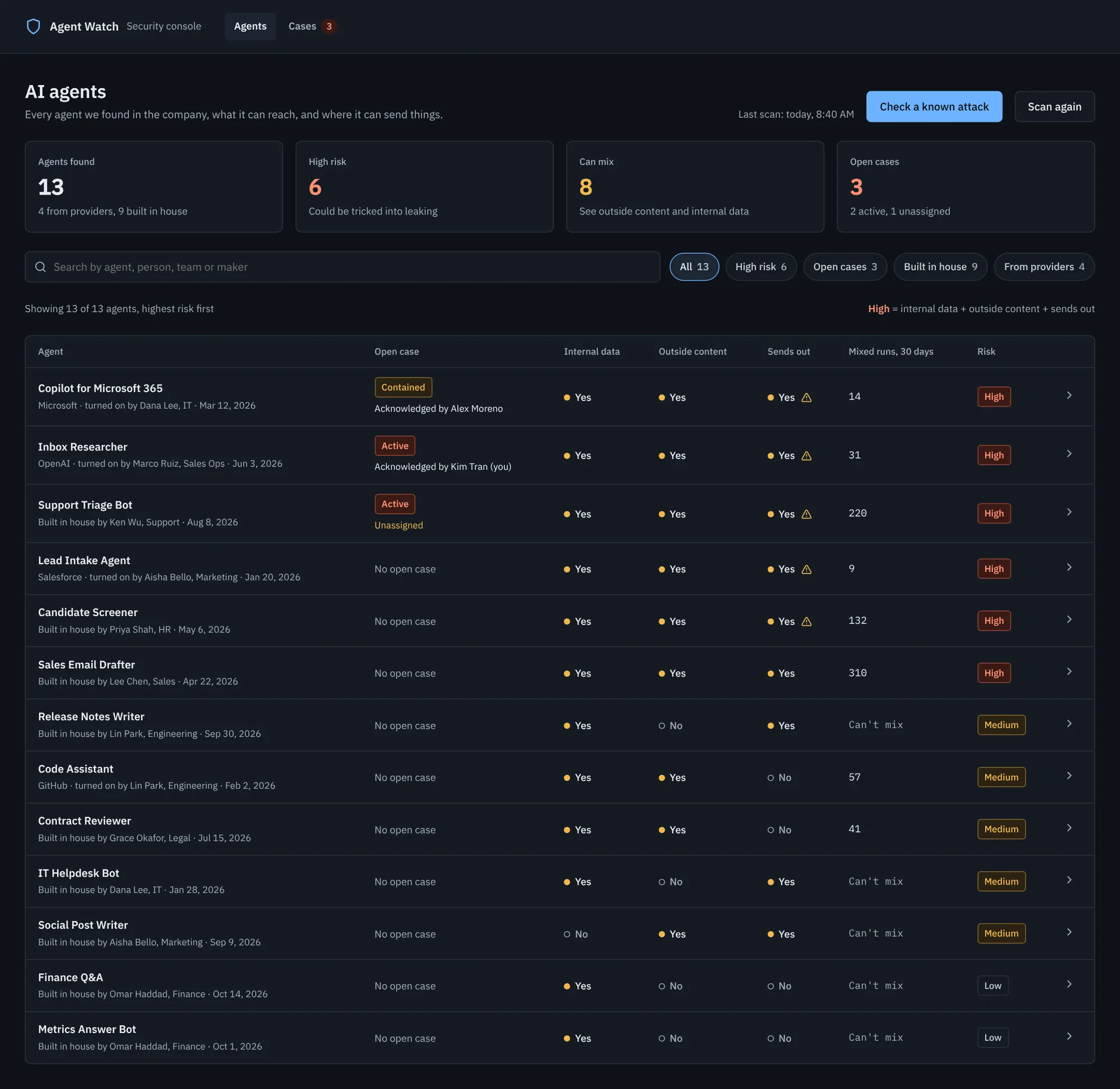
The inventory shows internal data, outside content and sends out for every agent.
Runs where outside content and internal data met are marked "Mixed".
Removing one risk factor is its own security measure level (L2).
When I check what an agent can send out, I want to see where data can go, so I don't assume a trusted service is safe.
Destinations are shown, not just a yes or no.
Trusted services that can pass data on count as a way out.
If a common fix won't work here, I'm told before I rely on it.
"Sends out" lists where each agent can send data.
The network check looks for data added to an address, not only for bad sites.
Fixes that won't work are marked "won't help here".
Trace What actually happened?
When I search for signs of a leak, I want to know what my search couldn't see, so I don't report "all clear" by mistake.
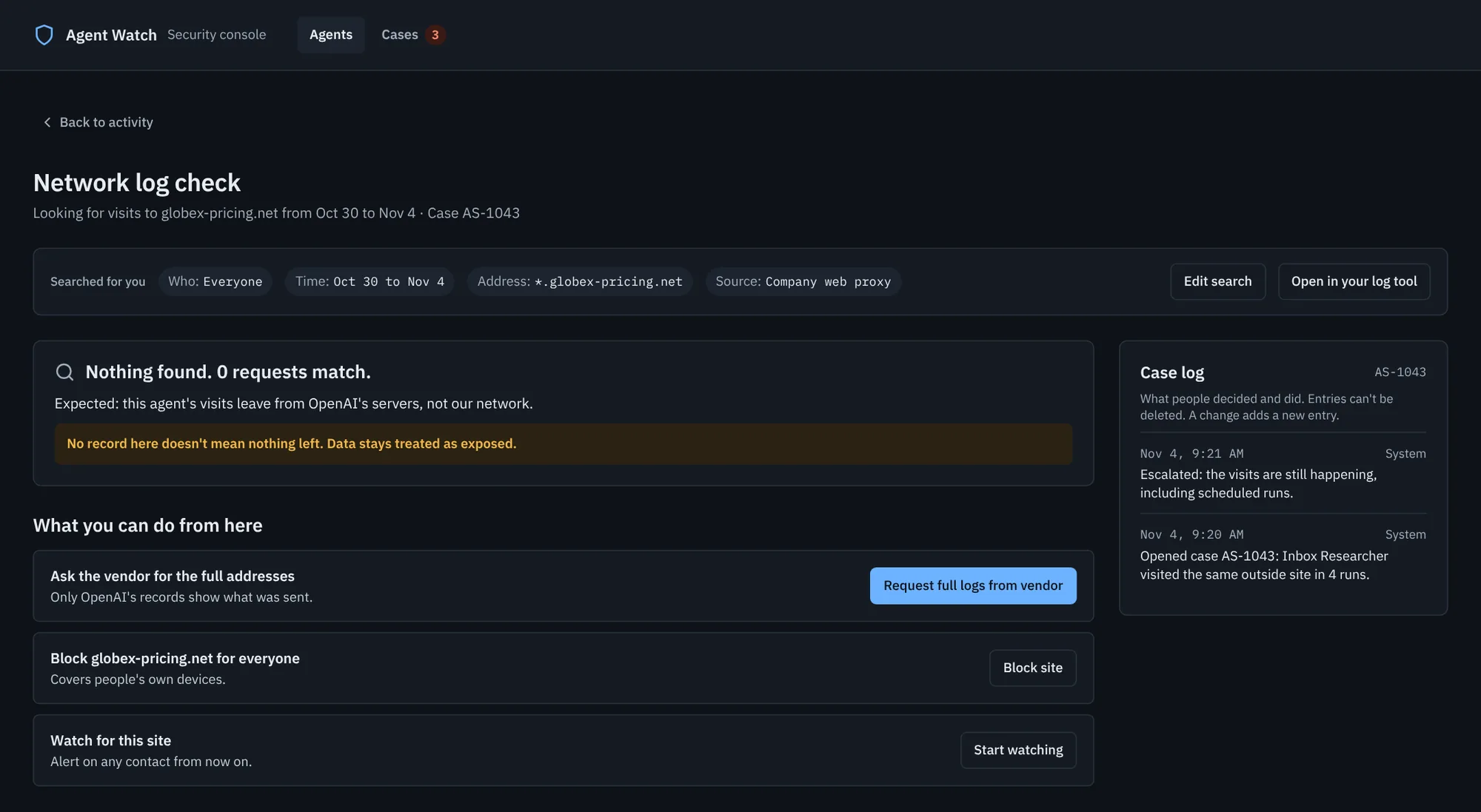
An empty result says which records were searched and which weren't.
Steps outside our records still appear, marked as unseen.
How far back each record goes is clear before I search.
An empty search says "not in our records", never "safe".
Steps on the provider's side are marked as unseen in the timeline.
Record coverage shows before searching.
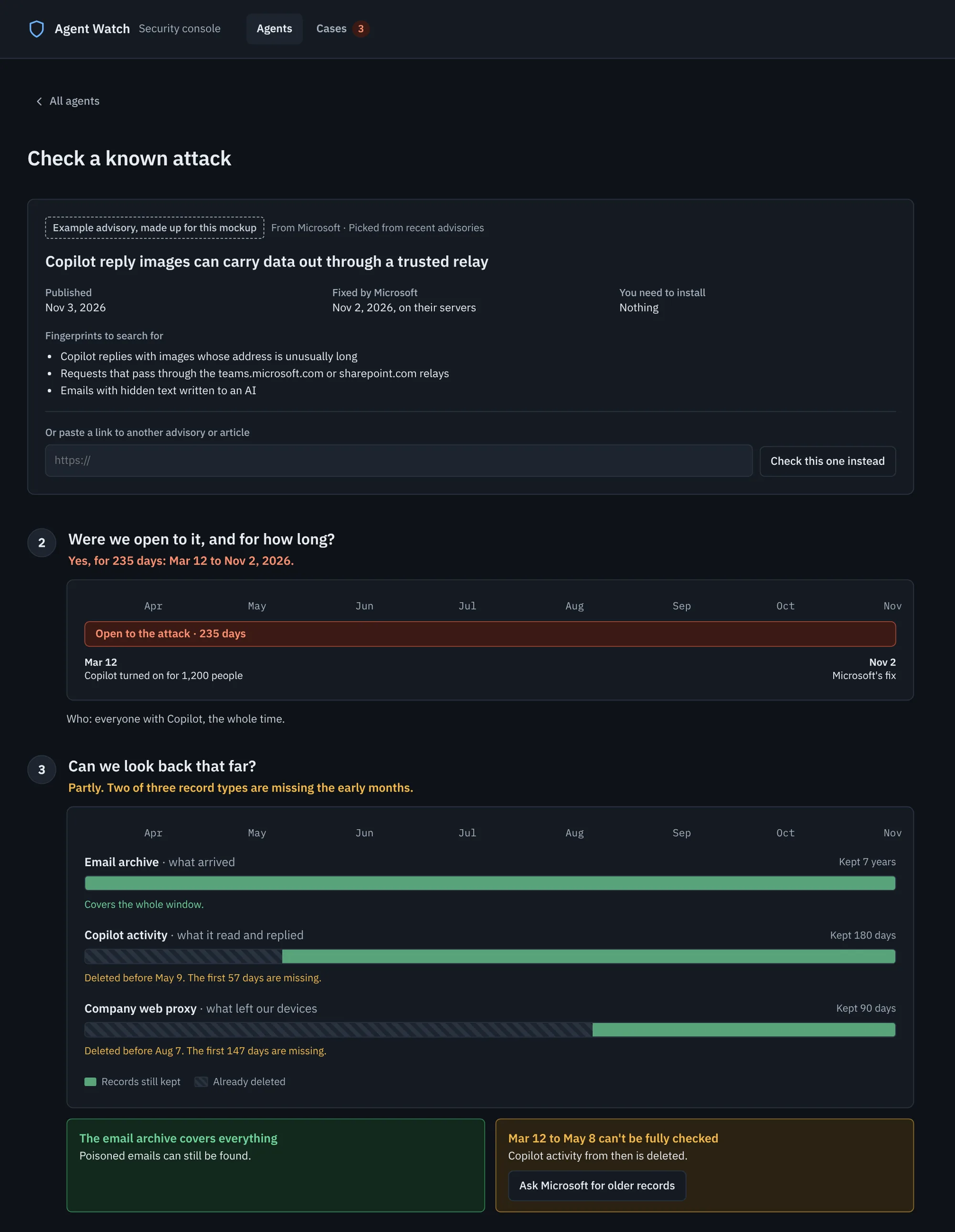
When I read about a new attack, I want to check whether it happened to us, so I can give an honest answer.
I can start from an advisory, not only from an alert.
I can see which agents match, and over what dates.
The answer says how sure it is, and which dates couldn't be checked.
"Check a known attack" starts from an advisory.
It shows the matching agents and the dates they were open to it.
Each answer says how sure it can be, and lists the dates that couldn't be checked.
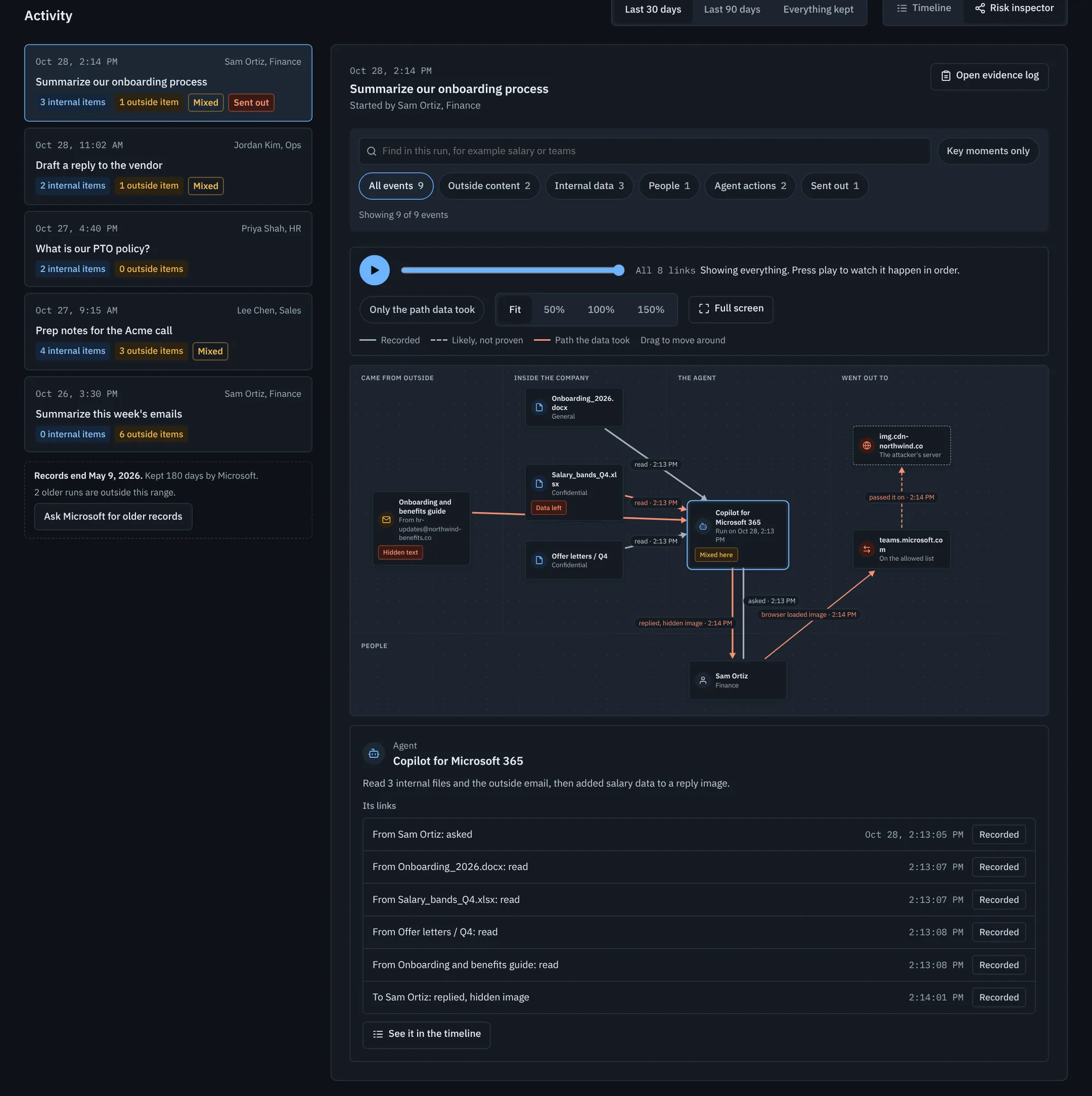
When I piece together what happened, I want to know which links are recorded and which are inferred, so I don't treat a guess as proof.
Recorded and inferred links look different.
I can confirm or reject an inferred link, and my call is recorded.
The Risk inspector marks links Recorded or Likely.
The analyst confirms or rejects likely links, and the choice goes in the case log.
When I look into what an agent did, I want to see only what the case needs, so I respect the people who used it.
Opening someone's conversation needs a stated reason.
Every look and every export is recorded.
Nothing leaves the company without privacy's approval.
The evidence log asks for a reason before it opens.
Every export is written to the case log.
Privacy approves anything sent to the provider.
Contain How do we stop it?
When an attack has planted something in the agent, I want to remove it before the next run, so the attack doesn't repeat itself.
I can tell when an agent has saved new instructions.
I can stop scheduled runs before I clean it.
Cleaning the agent is separate from removing the original source.
Runs that followed a saved rule are tagged in the timeline.
An agent with a planted rule is paused before its next scheduled run.
"Clean the agent" is its own level (L3), separate from removing the source (L1).
When I need to stop a leak, I want the smallest step that works, so I don't shut down a tool everyone relies on.
Steps are ordered by how much they disrupt.
I can see who a step affects before I take it.
How serious the threat is stays separate from how big the step is.
Five levels ordered by reach, from Remove the source to Disconnect.
Each level shows who it affects before it runs.
The threat has its own words, separate from the level: Active, Contained, Resolved.
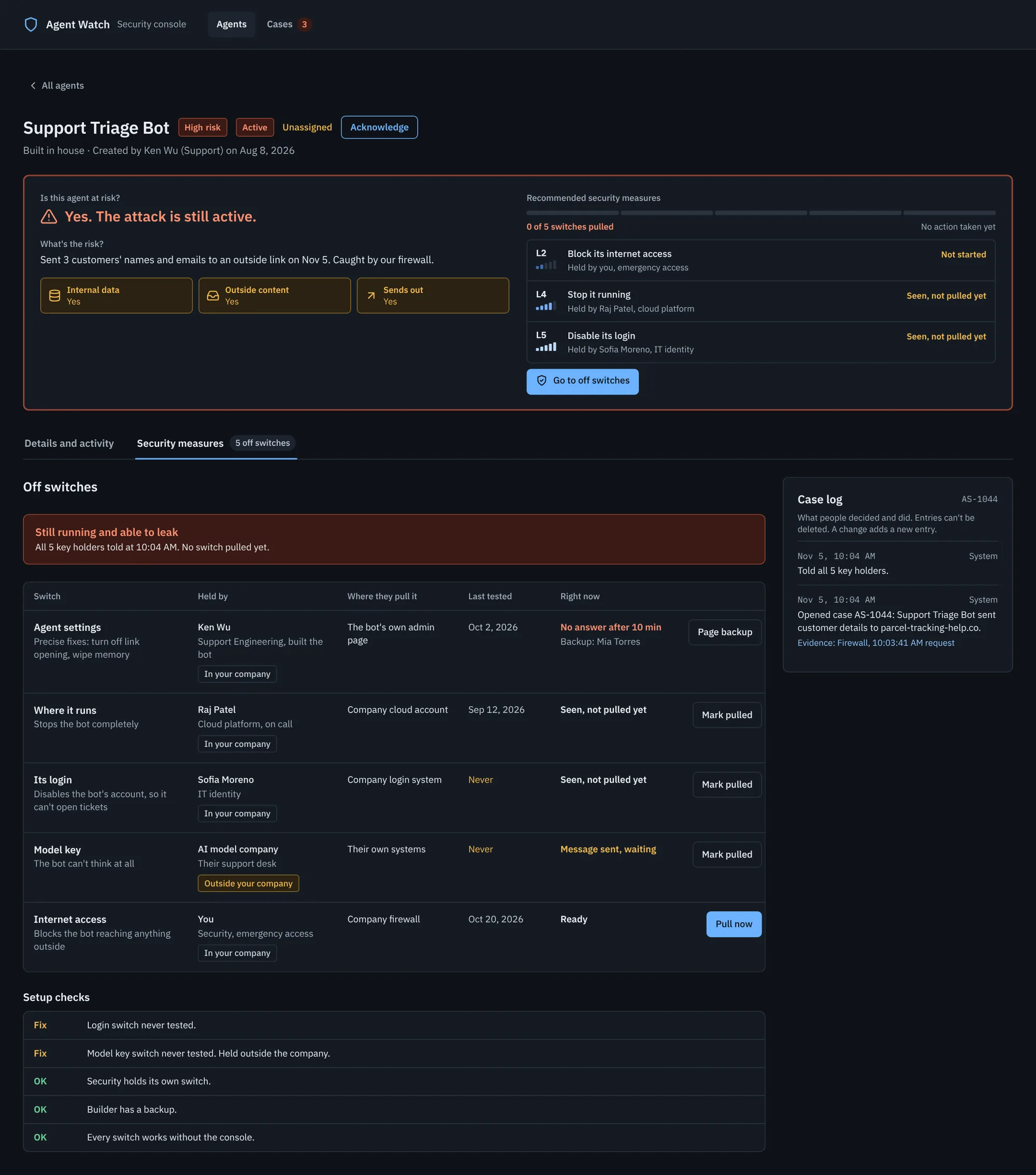
When the fix isn't mine to make, I want to know who holds it and reach them fast, so the leak doesn't wait.
Each step says who can take it, and requests to others are tracked.
Reports to the provider leave out the leaked data.
For homebuilt agents, everyone who can switch it off can be reached at once.
Each step shows who can take it: you, emergency access, someone in the company, or the provider. Requests are tracked.
Reports to the provider have the leaked data stripped out.
Homebuilt agents list every key holder, and any one switch stops the agent.
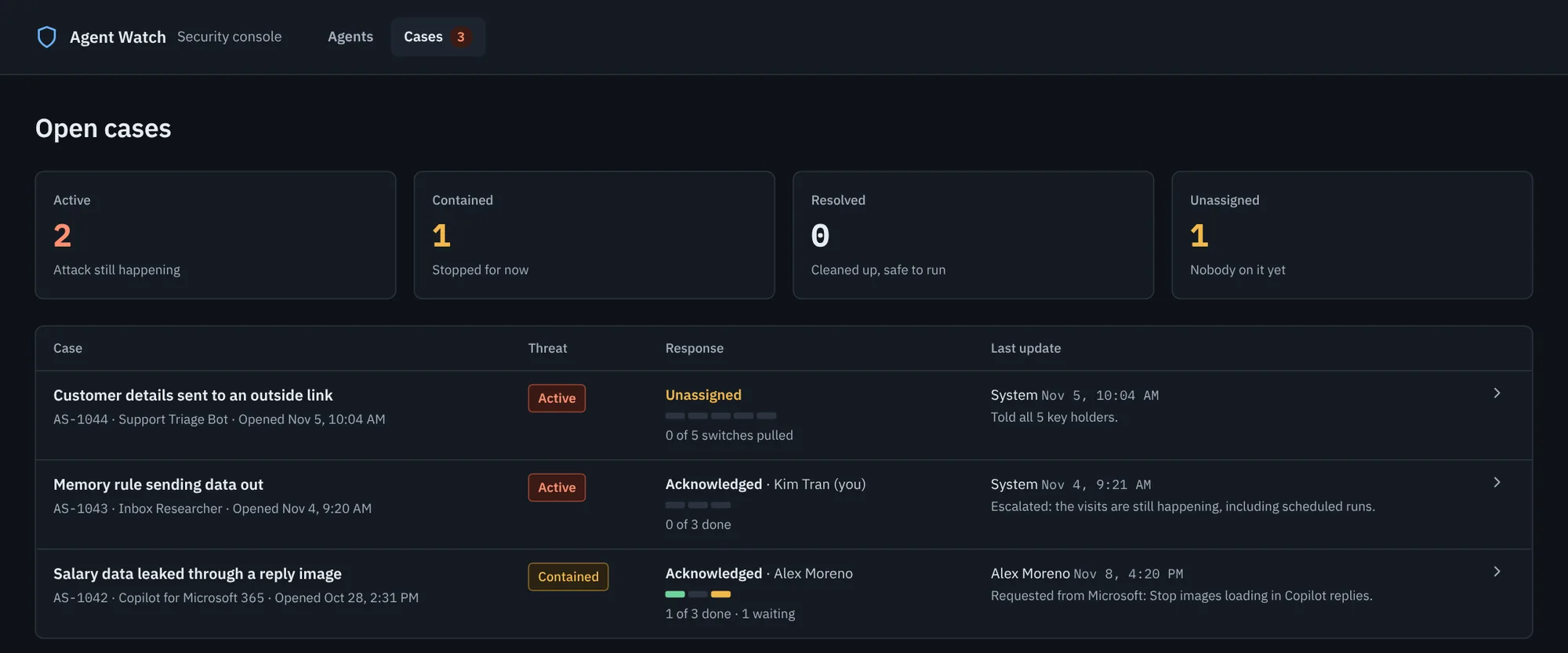
When I pick up a case someone else started, I want to see what's been done, so I don't repeat or undo their work.
Whether the attack is still happening and whether anyone is on it are shown as two separate answers.
The response so far is visible without digging.
Every step shows who took it and when.
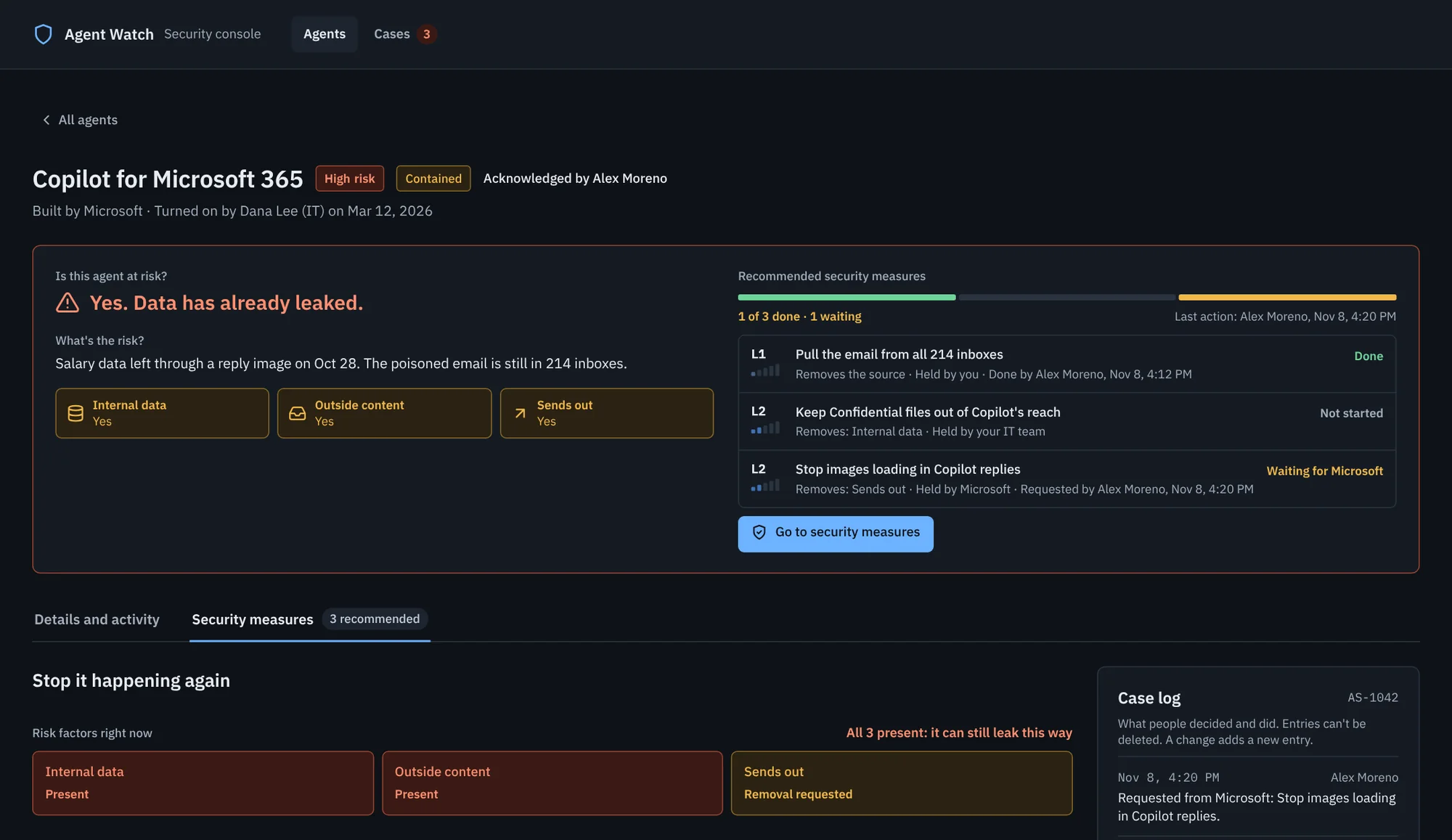
Every case shows two signals: the threat (Active, Contained, Resolved) and the response (Unassigned, or Acknowledged by whom).
An unassigned case can be acknowledged in one click, and each security measure shows who took it and when.
The cases list puts active, unassigned cases first.
The middle column is how we'd know each job is done. The jobs come from ten conclusions about real attacks (EchoLeak, ShadowLeak, AgentFlayer) and published guidance (the lethal trifecta, Meta's Agents Rule of Two, OWASP's Top 10 for Agentic Applications).
Illustrating my thoughts
At this point I needed a visual to help me understand the whole process, from the first alert to closing a case. There are two ways an attack makes it into the console: an alert fires, or you hear about an attack out in the world and need to answer whether you've been hit.
Two ways in lead to the same trace. Once the gap is found, three jobs run side by side until the case can close
Scroll sideways to see it all
The security console
The console has two main areas: an agent inventory and agent details. The inventory is where you find every agent in your organization and, more importantly, Identify how much risk each one carries (high, medium or low). Risk is based on the lethal trifecta, the main framework for how exposed an agent is to prompt injection.
Identify Know which agents have all three risk factors. Agents with all three are marked high risk and listed first
The agent details are the meaty part. On the Details and activity tab you can Trace what happened, and on the Security measures tab you can Contain an attack. There are five security levels, L1 to L5, for how far a measure reaches, from removing the source all the way to disconnecting the agent. That gives flexibility in how you respond. Each level also says who can take it, since different people have different levels of access and keys to the house.
I think of it like a house fire. A small stove fire doesn't mean you need to flood the building. You have the keys to the front door and can put it out yourself. But if the fire is too big, the fire department can come in through a window or the wall.
Finding nothing isn't the same as not being hit.
Trace Know what a search couldn't see. Like ShadowLeak, this agent's visits leave from the provider's servers, so an empty result can't mean all clearTrace Check an attack from the news. The record bars show which months can't be checked, because older records were already deletedContain Reach whoever holds the fix. This homebuilt agent has five off switches held by different people, one of them outside the companyExploration Tell proof from a guess. Solid lines are recorded, dashed ones are likely but not proven. This is the most conceptual part, and the least tied to what can be built today
Two signals, not one
The last change I made was to how a case shows its status. At first each case had one status: Still leaking, Paused, In progress or Contained. That one word was answering two different questions. "In progress" could be read as "attack in progress", and "Paused" was really an action someone took.
So I split it in two. The threat says whether the attack is still happening: Active, Contained or Resolved. The response says whether anyone is on it: Unassigned, or Acknowledged by whom. Contained isn't the same as Resolved. An agent can be stopped for now long before it's clean and safe to run again.
Contain See what's been done. Each case answers two questions at a glance: is the attack still happening, and is anyone on it?
Not all of this can be built today. My notes on what's buildable flag the Inbox Researcher as the hardest part, because an agent that runs on the provider's servers may leave few records a company can reach.
🧩
What's still open:
Where alerts come from. Spotting an attack was never designed. The console mostly starts once someone knows something is wrong.
No interviews. The hand-off conclusion rests on my own assumption alone. It's the first thing I'd check with someone who does this work.
What can't be seen. Agents on the provider's servers, agent memory and unattended runs may leave no records a company can reach.
The Risk inspector is an exploration, not a proven tool.
Who acts. A "signed in as" view, and a "save evidence first" step before cleaning an agent, were parked, not built.
💡
What I learned:
I built more than I needed. Twelve screens in, I stepped back and reframed the project around the reasoning, with the screens as supporting evidence.
The bridge I'd skipped was the job. Writing the job and its checklist first made each feature earn its place.
In an unfamiliar field, being clear about what you don't know turned out to be a design principle, not just a caveat. A guess is marked as a guess, and an empty search says "not in our records" instead of "safe".